How to Turn a Podcast into Short-Form Video Clips: A Complete Guide
How to turn a podcast into short-form video clips: choosing moments, clip length, vertical framing, captions, two-host episodes, and where AI fits.
Updated By ClipFlap editorial team
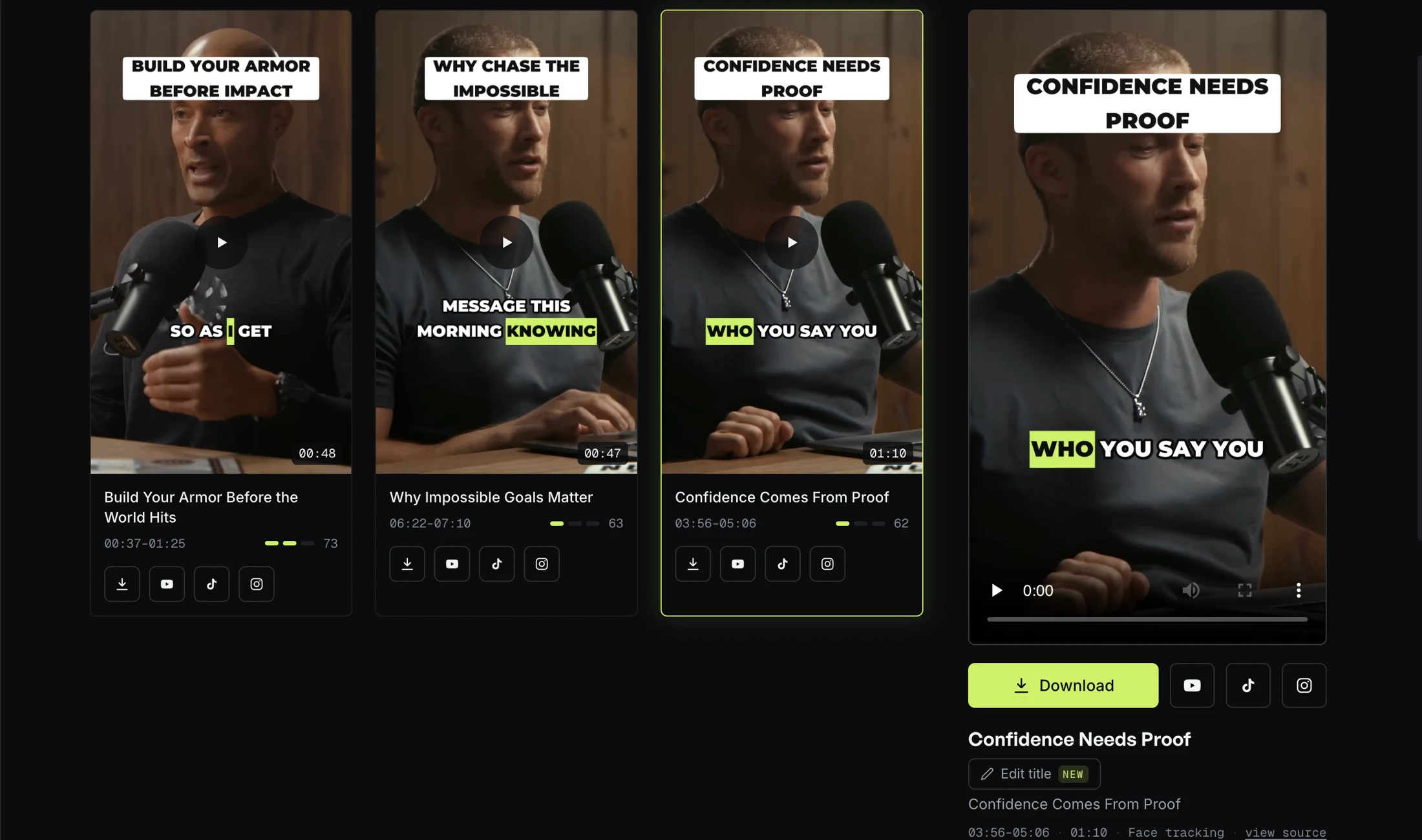
Podcasters have a discovery problem. Loyal listeners sit through hours of audio, but the people who have never heard of the show are scrolling video feeds. Turning an episode into short-form clips is how the second group finds the first: fifteen to ninety seconds of a conversation, reframed to vertical, captioned and titled so that a stranger understands it in the first two seconds.
The short answer to "how do I turn a podcast into clips" is six decisions made in order: which moment, where it starts and ends, how it is framed, how it is captioned, what the hook says, and where it goes. Get the first two right and the rest is craft. Get them wrong and no caption style saves the clip. This guide walks through all six, links to a deeper article on each, and ends with the mistakes we see most often on real episodes and where an automated workflow helps.
The Value of Video Clips for Podcast Growth
Audio limits where a show can be discovered. Short-form feeds are built around video, so a clip reaches people an episode never will, and a small share of those people come back for the full show. A clip is a funnel with the episode at the bottom of it.
Video clips also carry more than audio does. A reaction shot, a face reading the guest's line, a caption that lands with the word: these are what make a moment shareable rather than merely quotable. And producing them does not require a film crew. A wide two-camera podcast shot, a webcam recording, even a screen share contains usable footage. An audio-only show can still ship clips with a static visual and captions doing the work; the selection method is the same because it works from the words.
The economics only hold if a clip costs far less than an episode. One episode can be a week of posts, and for an agency that bills by the post it has to be. That is the reason the workflow is worth automating, and the reason the rest of this guide is about judgment rather than software.
Selecting the Right Moments for Clipping
Not every minute of an episode belongs in a feed. The moments that travel share one property: they make sense with no context. A viewer who has never heard the show has to understand the clip in its first two seconds and feel, at its last, that nothing was withheld.
Most weak clips are good moments cut in the wrong place, and the wrong place is almost always the start. Marking the moment a topic begins gives a clip ten seconds of run-up before the line anyone would share. The better habit is to read the transcript, find the sentence that would work as a quote on its own, a claim, a reversal, a story's payoff, a surprising number, and treat it as the peak of the clip. Then walk back only to the first sentence that stands alone, and forward only until the thought closes.
A useful checklist when reviewing an episode:
- Does it stand alone? No pronoun without a referent, no callback to last week, no "as I said earlier".
- Does it open on a real sentence? "But the thing is" and "So, like I said" tell the viewer they walked in late.
- Does it close the thought, not just the sentence? A connector, an unanswered question, an unfinished list or an announcement not delivered all leave the idea hanging.
- Is it specific? "Consistency matters" is true and unshareable. Look for the concrete version of the same idea.
- Does it depend on something you can see? A chart, a whiteboard, an object held up. If so, it will not survive vertical.
Excitement alone is not a reason to pick a moment. A loud laugh with the setup three minutes earlier, an intro, a sponsor read, a joke about the microphone: these are the passages picked most often and shared least. The full method, including the list of moments that look strong and are not, is in how to find the best moments in a podcast; the criteria a finished clip should meet are in what makes a good podcast clip; and how many to take from one episode, and why more is not better, is in how many clips from one podcast episode.
Length follows from the boundaries, not the other way round. A one-line reversal is twelve seconds; a story with a setup is seventy. Ranges by type of moment and today's platform limits are in podcast clip length for TikTok, Reels and Shorts.
Automating the Clipping Process with AI
Manual clipping is slow in a specific way: the hours go into listening, not cutting. An automated first pass changes that by reading the transcript instead. Highlight detection in a tool like our AI podcast clip generator looks for the sentences strong enough to stand alone, builds a candidate around each one so the idea starts and finishes inside the clip, discards candidates from a list of things that never travel, and scores what is left. Framing and captions come after, and work from the picture and the sound.
Knowing that the selection reads words explains both its strength and its blind spot. It is good at finding complete thoughts across a three-hour episode without fatigue. It cannot see. A guest holding up an object, a chart being pointed at, a reaction that was the whole joke: the words describe the moment and the picture may not show it. In one internal test on a football game recording, the selector chose three commentary moments and only one showed the goal on screen. On a conversational podcast this is rarer, but the review step exists for it. How the selection works, and what it cannot do, is in how AI finds podcast highlights.
What automation changes is your role: from editor to reviewer. Upload a link or a file, get back a set of candidates with hooks and scores, and spend the time you used to spend scrubbing on judging each one against the checklist above.
Optimizing Clips for Social Media Platforms
TikTok, Instagram Reels and YouTube Shorts all take the same vertical file, and as of this writing all accept clips longer than a podcast moment needs; check the help pages linked at the end, because those limits change. The differences that matter are in framing, captions and the hook.
Vertical Video Format
A wide 16:9 recording has to become a tall 9:16 clip, and the naive answer, a crop that chases whoever is speaking, looks broken: the frame jumps, the reaction is cut, and occasionally the crop lands on a microphone stand while it decides who to follow. The right answer depends on what is in the shot.
- One person on camera: a single crop that follows the face but moves rarely, and holds wide when the camera itself is chasing a speaker across a stage.
- Two people at a table: both faces stacked vertically for the whole clip, so the reaction stays on screen and the frame never jumps. This is the common podcast case and the one most tools get wrong, because it is decided by counting faces, and a portrait on the wall, a face on a phone held to camera or the back of a head in an over-the-shoulder shot all count as faces to a detector. Read how to make clips from a two-person podcast.
- Three or more at a table: a crop on the person speaking, decided per camera shot, or the whole table when nobody clearly leads.
Framing should change on the source's own camera cuts, never in the middle of a shot, and the subject should sit clear of the bands where the platforms stack their own buttons and captions.
Automated Captions
Most viewers meet a clip muted, so captions are how it gets watched. Three things matter more than the font: each word appears when it is said, never half a second early; lines hold three to five words and break at phrase boundaries, never inside a name or a number; and the words viewers check, proper names, numbers and anything in a second language, are right. Language rules matter too: French keeps its space before a question mark and never breaks the line there; Arabic reads right to left and its letters join, so letter-spacing that looks stylish in Latin script makes it unreadable. Full workflow in how to add captions to podcast clips; the dialect question for Arabic in Darija vs Modern Standard Arabic subtitles.
Branding and Call-to-Actions
The hook card shown for the first seconds is a promise, and it should be one the guest would sign. "Why he refused to chase the algorithm" over a clip in which he explains exactly that is a hook; "you won't believe what he said" is not. Specific beats clever, faithful beats both, and a hook that oversells draws the most negative comments of anything on the page. Place it where it covers no face: at the top for a single speaker, at the seam between the two panels for a stacked pair. A small mark in a corner is fine; a call to action belongs in the post text rather than over the guest's face.
When Manual Editing Still Matters
Automation produces a first draft, and the draft needs a reviewer. Three things a human catches that a pipeline does not:
- Whether the clip stands alone. The context test is editorial judgment, not a measurement.
- Whether the hook is faithful. A generated title can be cleverer than it is true.
- Whether the visual was the point. Selection reads words; you watch the picture.
There are also cases where a traditional editor is the right tool: a trailer with B-roll and sound design, a paid advert, anything where polish is the product. And a clip built from a bad transcript inherits every error, so a misheard name or a dialect rewritten into a standard register should send you back to the transcript rather than forward to publishing. Treat the seven checks in what makes a good podcast clip as the review.
Publishing and Tracking Performance
Distribution is where the platforms differ. YouTube Shorts sit next to the episode on the same channel, so a Short can point at the episode directly, and it is the platform ClipFlap can publish to from the results page once a channel is connected, immediately or on a schedule. TikTok reaches the most people who have never heard of the show, which means the moment has to need zero context and the hook has to name the claim rather than the guest; clips are downloaded and uploaded with a caption written for that audience. Reels reaches people who half-know the show, so a caption that names the episode does better there than on TikTok. Details in how to turn a podcast into YouTube Shorts and how to turn a podcast into TikTok clips.
A cadence that survives a busy week: publish the strongest clip the day the episode goes live, schedule two or three across the week, and keep one back for the day before the next episode so the feed never goes quiet. Then watch what the comments and completion rates say about which kinds of moments travel for your show, and pick more of those next time. Consistency compounds; a batch dumped on one day does not.
Frequently Asked Questions
Can I make video clips from an audio-only podcast?
Yes. Use a static image, a waveform or a photo of the hosts as the visual, and let the captions carry the clip. The selection method is identical because it works from the transcript. What you lose is the reaction shot, which is why audio-only clips lean harder on the hook and the captions.
What is the ideal length for a podcast short-form clip?
As long as the thought. In practice a single claim lands in twelve to twenty-five seconds, a claim with its reason in twenty-five to fifty, and a story with a payoff in forty-five to ninety. Platform ceilings are far above all of these today, so the ceiling is rarely the constraint; cutting a story to a fashionable length is. Details and today's limits are in the clip length article.
Do I need manual editing skills to create clips?
Not to produce them. You need judgment to review them: whether a clip stands alone, whether the hook is faithful, whether a name is spelled right. Those are editorial skills, not software skills.
Which social platforms are best for podcast clips?
The one where your next listeners already are. YouTube Shorts is the natural fit for a video podcast because the episode lives on the same channel and a clip can point to it. TikTok reaches the most strangers. Reels reaches the people who already half-know the show. LinkedIn works for professional topics. Pick the platforms where your audience is rather than trying to be everywhere.
Start Repurposing Your Content Today
Turning an episode into clips is the highest-leverage hour in a podcaster's week when the clips are judged well, and a waste of one when they are not. Paste the link to your next episode into the podcast-to-clips workflow, review the candidates against the six decisions above, and publish the ones that pass.
Guides on this topic
- How to turn a podcast into TikTok clips that work for strangers
A podcast-to-TikTok workflow: moments that need zero context, hooks written for strangers, vertical framing, captions, and publishing to TikTok.
- How to turn a podcast into YouTube Shorts (and publish them from the same place)
A podcast-to-Shorts workflow: moments that stand alone, vertical framing, captions for muted autoplay, then publish or schedule to your channel.
- How to make clips from a two-person podcast without losing the other face
Two-host podcasts are the common case and the naive vertical crop breaks them. When to stack both speakers, when to follow one, what fools detection.
- How many clips should you make from one podcast episode?
A working rule is one clip per five minutes of conversation, with a floor and a ceiling. Why more candidates make the set worse, and how to decide per episode.
- How to find the best moments in a podcast (and why most clips start too late)
A practical method for picking podcast clips that stand alone: anchor on the peak, keep the whole thought, and cut where the idea closes.
- Podcast clip length for TikTok, Reels and Shorts: what actually fits each feed
How long should a podcast clip be? Platform limits as of today, why the honest answer is “as long as the thought”, and how to set a target.
- What makes a good podcast clip? Seven checks before you post
A good podcast clip makes sense with no context, starts clean, closes the thought, keeps the right face on screen, reads muted, and has a hook it delivers.
See how ClipFlap picks podcast clips →
Try it on your own episode
10 free minutes of processing, no card required. Processing time varies with source length and queue load; review each clip before publishing.